Tutorial 6 - Fitting models using optional inputs#
In this tutorial, we introduce adding other features to your model using the model callout. In this example, we will take the simpleDDM model, add a contamination model to it, then change its diffusion rate to 0.1.
First, import PyBEAM’s precoded submodule.
[1]:
# import PyBEAM's precoded submodule
import pybeam.precoded as pbp
We then call the simpleDDM with the additional features.
[2]:
# define simpleDDM with additional features
model = pbp.simpleDDM(sigma = 0.1, contamination = 'uniform')

# outputs parameters used by your model
model.parameters()
[2]:
['tnd', 'w', 'mu', 'b', 'g', 'gl', 'gu']
We now have a model with a 0.1 diffusion rate and the parameters needed for a contamination model! We use this in the same way as the models introuduced in the earlier tutorials. In this case ‘g’ sets the contamination strength, ‘gl’ sets the lower threshold for the uniform contamination distrbution, and ‘gu’ sets the upper threshold for the uniform contamination distrbution.
[3]:
# parameters for synthetic data
phi = {'tnd' : 0.25, # non-decision time
         'w' : 0.5,  # relative start point
        'mu' : 0.1,  # drift rate
         'b' : 0.1,  # decision threshold location
         'g' : 0.05,
        'gl' : 0.25,
        'gu' : 5.0}

# generate synthetic data
rt = pbp.simulate(N_sims = 1000,   # number of data points to simulate
                   model = model, # dictionary containing model information
                     phi = phi)   # parameters used to simulate data

# plot data and model likelihood function
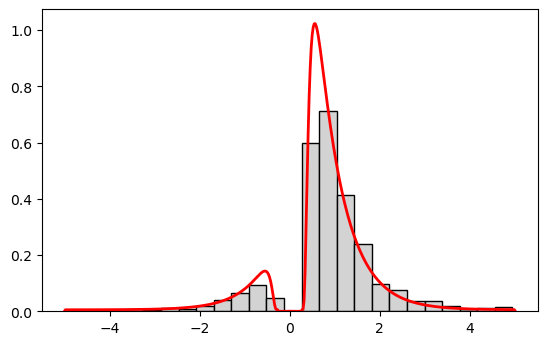
fig = pbp.plot_rt(model = model, # dictionary containing model information
                    phi = phi,   # parameters used for model rt distribution
                 rt_max = 5.0,   # dictionary of simulated rt data
                     rt = rt);   # dictionary of simulated rt data